Detectors
In practice, photodetectors allow the conversion of electromagnetic radiation into electric signals. BMO provides the Detector as an element to capture and evaluate optical data during and after running a simulation, respectively. The Detector is designed to accumulate e.g. field or ray data, enabling analysis of intensity distributions, interference patterns, and other beam properties. Currently, post-processing capabilities are limited to the functionality as described in the Spot diagrams and Field distributions sections.
In general, detector-like elements are supposed to fall under the BeamletOptics.AbstractDetector type, which defines a interface for detector implementations.
Resetting detectors
In general, the data stored in a Detector is not automatically reset between calls of solve_system!. This task is placed within the responsibility of the user. A detector reset can be performed with the empty! function.
Detector type
A Detector can be easily spawned by initializing e.g. pd = Detector(5mm) which will create a 5x5 mm² detection screen.
BeamletOptics.Detector Method
Spawns a quadratic Detector surface that is aligned with the neg. y-axis. The detector edge length can be configured via edge_length. Additionally, continued tracing can be configured via the stop flag where
falseindicates continued tracingtruestops the incoming beams as with any hard target
BeamletOptics.Detector Type
Detector <: AbstractDetectorRepresents a flat rectangular or quadratic, infinitesimally thin surface in R³. The detector surface is a detection screen that captures incoming ray or beamlet data. The active surface is discretized in the local R² x-y-coordinate system. If configured, beams or beamlets can continue tracing after hitting the detector.
Hits
Hits are represented via the AbstractDetectorHit interface. An empty detector is able to detect any kind of incoming hit, but as soon as the initial hit type has been determined, all following hits must share the same type, i.e. no cross-interaction between hit types is allowed.
Functions
The following functions allow a posteriori evaluation of hit contributions via e.g. f(detector). Refer to the respective function documentation.
Additional information
In general, the detection surface is represented by a flat Mesh that has been rotated such that the surface normals point towards the negative y-axis for the initial positioning. This allows for the definition of a left-handed (x, z) surface coordinate system, where incoming beams intersect against the detector surface normal.
Reset behavior
The Detector must be reset between each call of solve_system! in order to overwrite previous results using the empty! function. Otherwise, the current result will be added onto the previous result.
Moving after solving
Do not move the detector before calculating all parameters of interest for the current system configuration. Since the detector stores pointers to the current system and beam states, silent errors might occur.
Fields
shape: geometry of the active surface, must represent 2D-fieldinxanyydimensions, normal vector direction must adhere to definition abovehits: a union ofNothingand all implementedAbstractDetectorHits, resettable viaempty!(note that only one type is allowed at any time)stop: a boolean value that allows for continued tracing after "passing through" the detectorlock: locks theDetectorfor multithreading-safepush!ing to the hits vector
After solving a system containing a Detector, the methods listed below can be used in order to analyze the stored data. If no data is obtained during the tracing procedure, an error message will be stored.
Spot diagrams
The spot_diagram method provides a straight forward way to generate spot diagrams, which are commonly used to perform initial assessments of the optical performance of an imaging setup.
BeamletOptics.spot_diagram Function
spot_diagram(d::Detector)Returns an array of 2D points in local detector coordinates that represent the points of intersection for incoming beams.
Beams
For Beams, the point of intersection on the screen surface is stored.
Beamlets
For GaussianBeamlets, the projected 1/e² waist is returned. The number of points and radius can be adjusted via the num_spots and crop_factor keyword arguments.
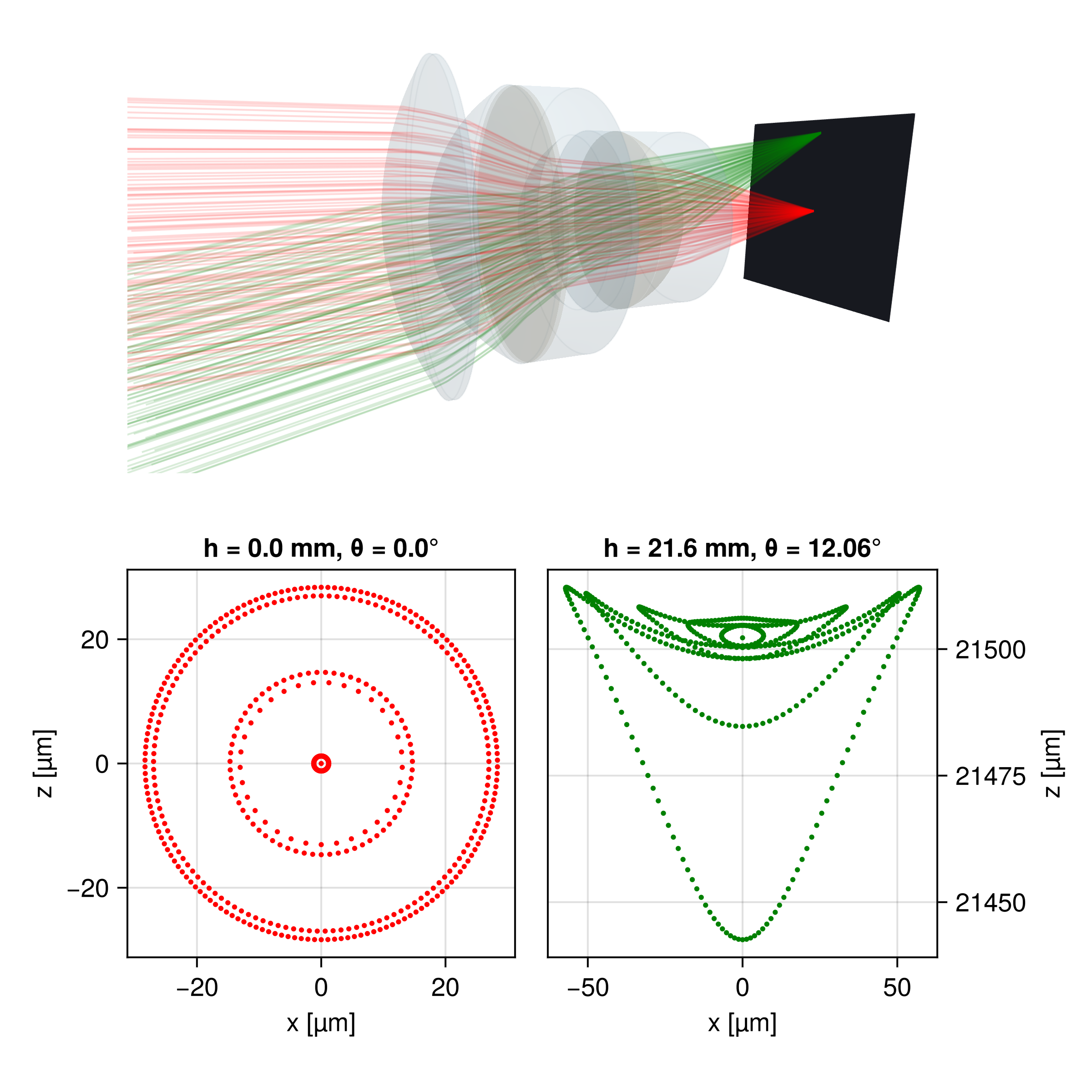
The following image shows the spot diagram of a Sonnar lens. Two CollimatedSources are traced through the system at different angles. A Detector is positioned at the focal plane to capture the resulting spot diagrams, which are visualized using the method explained above.
Field distributions
Alternatively, the detector data can also be used to reconstruct electric field distributions of incoming beams on its surface using coherent addition. Depending on the beam type, either plane wave or Gaussian beam models are used. As a user, this data can be accessed using the electric_field interface.
BeamletOptics.electric_field Method
electric_field(pd::Detector; kwargs...)Compute a two‐dimensional electric field based on incoming rays or beams as captured by a Detector. The returned E-field map is sampled on a regular n×n grid in the detector's local (x,z)-plane. Note that the pd local coordinates are given in a (x, z) basis where the normal vector forms a left-handed system.
Resetting detectors
Be sure to call empty!(pd) before each new measurement if reusing the same detector.
Keyword Arguments
The following generic kwargs can be used for all hit types:
n::Int=100Number of sample points per axis.crop_factor::Real=1Scales the width of the sampling window returned bycalc_local_lims; values >1 expand, <1 shrink.x_min, x_max, z_min, z_maxManually override the sampling bounds in the local x or z directions. If left asInf, the bounds fromcalc_local_limsare used.x0_shift::Real=0, z0_shift::Real=0Applies a constant offset to the entire x or z coordinate arrays, useful for recentring or testing alignment.progress::Bool=trueShows a progress bar once the calculation has run forget_progress_threshold()seconds (default 5 s). It is only drawn ifstderris a terminal.
Ray specific keyword arguments
center::AbstractCenterAlgorithm=Centroid()How the sampling window is centred.Centroid()uses the projection‑weighted centroid,MinMax()uses the geometric mid‑point of the bounding box.
Scaling
The returned values for ray hits correspond to the E-field of the point spread function. The values are raw/unscaled and not equal to a Strehl ratio. This feature is not yet added. In future versions a pupil finder along with a Strehl estimator will be added.
Beamlet specific keyword arguments
num_spots::Int=50Number of hit spots used to determine bounding box
Returns
A tuple (xs, zs, E) where
xs::LinRange{T}andzs::LinRange{T}are the sampled coordinates in the detector's local x and z axes,E::Matrix{Complex{T}}is the corresponding raw/unscaled intensity map, except forPolarizedRayHits, see below.
PolarizedRayHit hits
For PolarizedRays, the per-ray E0 field vectors are added coherently as 3D vectors in global coordinates (not projected onto the detector plane), so E::Matrix{Point3{Complex{T}}}. No obliquity/projection factor is applied: unlike the scalar ray case, the relative projection between rays is already encoded in their vector directions. As with the scalar case, the result is raw/unscaled (E0 carries Fresnel/Jones amplitude factors but not ray-tube area or pupil-sampling density).
Unpolarized light
Since polarization states with orthogonal E0 do not interfere, an unpolarized PSF is not obtained from a single coherent trace. Instead, trace twice with orthogonal input polarizations (e.g. E0 = [1,0,0] and E0 = [0,0,1]) and incoherently add the resulting intensities, i.e. I_total = intensity(E_x) .+ intensity(E_z).
For convienience, the intensity function returns flux values directly. The optical_power method can be used in order to obtain the total optical power on the detector surface.
BeamletOptics.intensity Method
Calculates the intensity distribution on the Detector via
where E is the electric field value and Z is the wave impedance. In general, vacuum wave impedance is assumed. This function returns a tuple (x, y, I). For more information on the available keyword arguments, refer to the electric_field documentation.
Gaussian beamlet interference
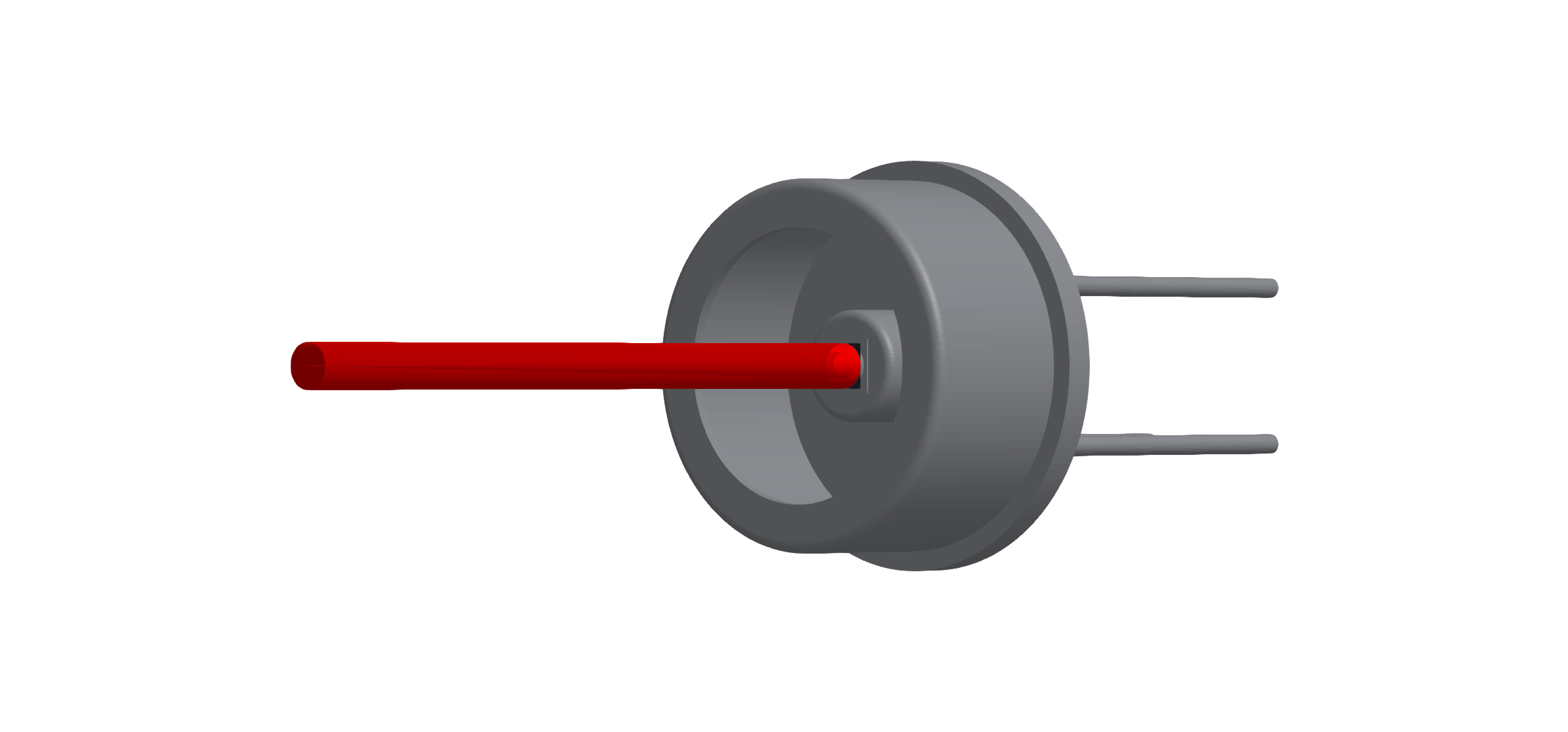
One of the use cases of the Detector is to analyse interference patterns. Below a rendered example of a detector model (FDS010) can be seen. The detector active area is marked in blue (1x1 mm²).
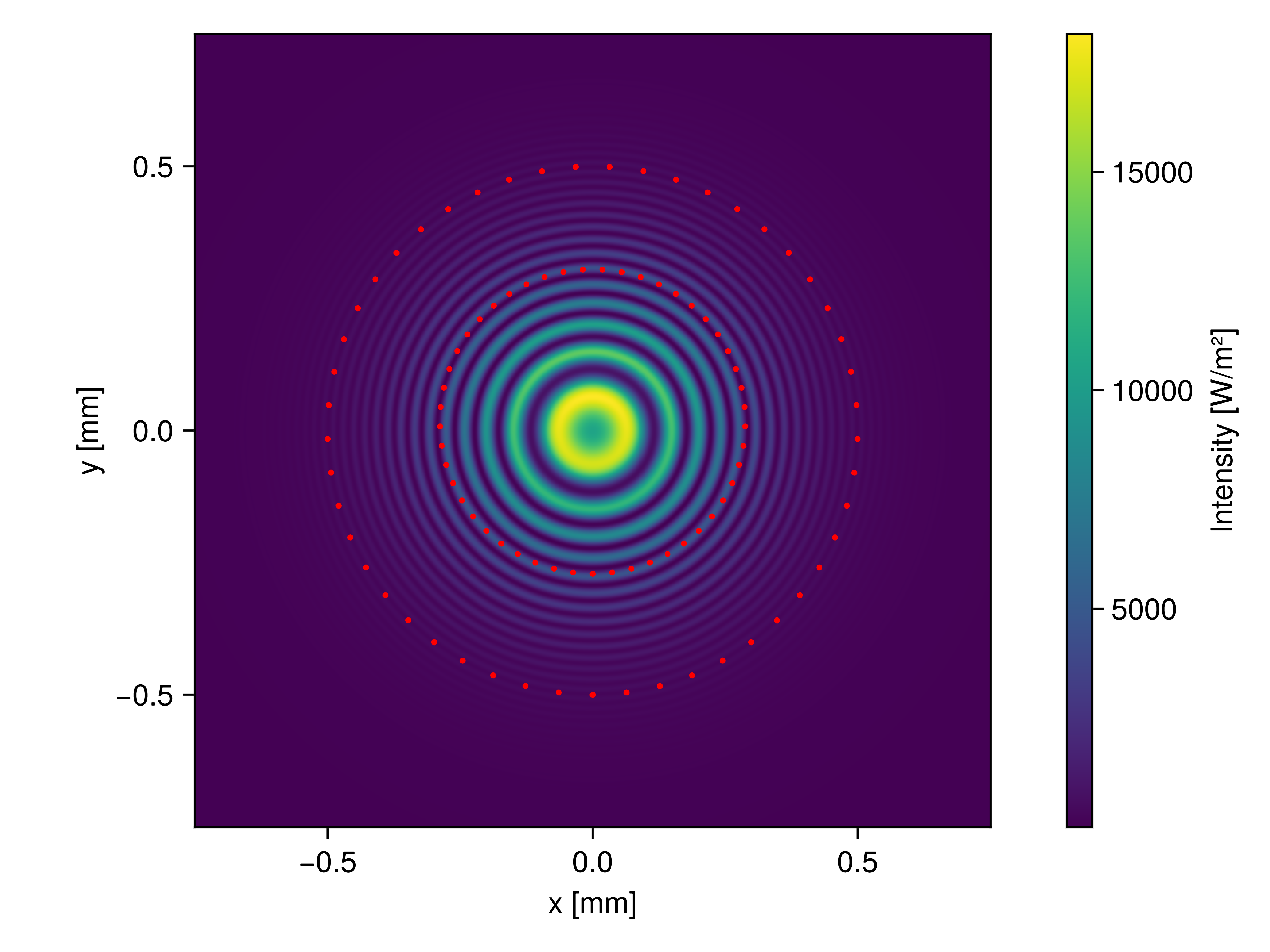
The figure below demonstrates an example intensity distribution captured by the detector pictured above, showing radial fringes due to a mismatch of the radii of curvature of the interfering GaussianBeamlets. In addition, the beam waists have been visualized.
Interferometer tutorial
Refer to the Michelson interferometer section for a detailed tutorial on how to use the Detector.
Point spread function estimation
If a Detector is placed in the focal plane of an imaging system, the coherent addition of the ray-attached plane waves yields an estimate of its point spread function (PSF). For the Sonnar example from the Spot diagrams section the following distribution was calculated for the on-axis beam bundle.
Experimental feature
The PSF estimation does not use pupils (yet) but merely superimposes the ray-attached plane waves. It gives qualitatively sound results, but requires good sampling of the problem to be quantitatively meaningful. No Strehl ratio is calculated.
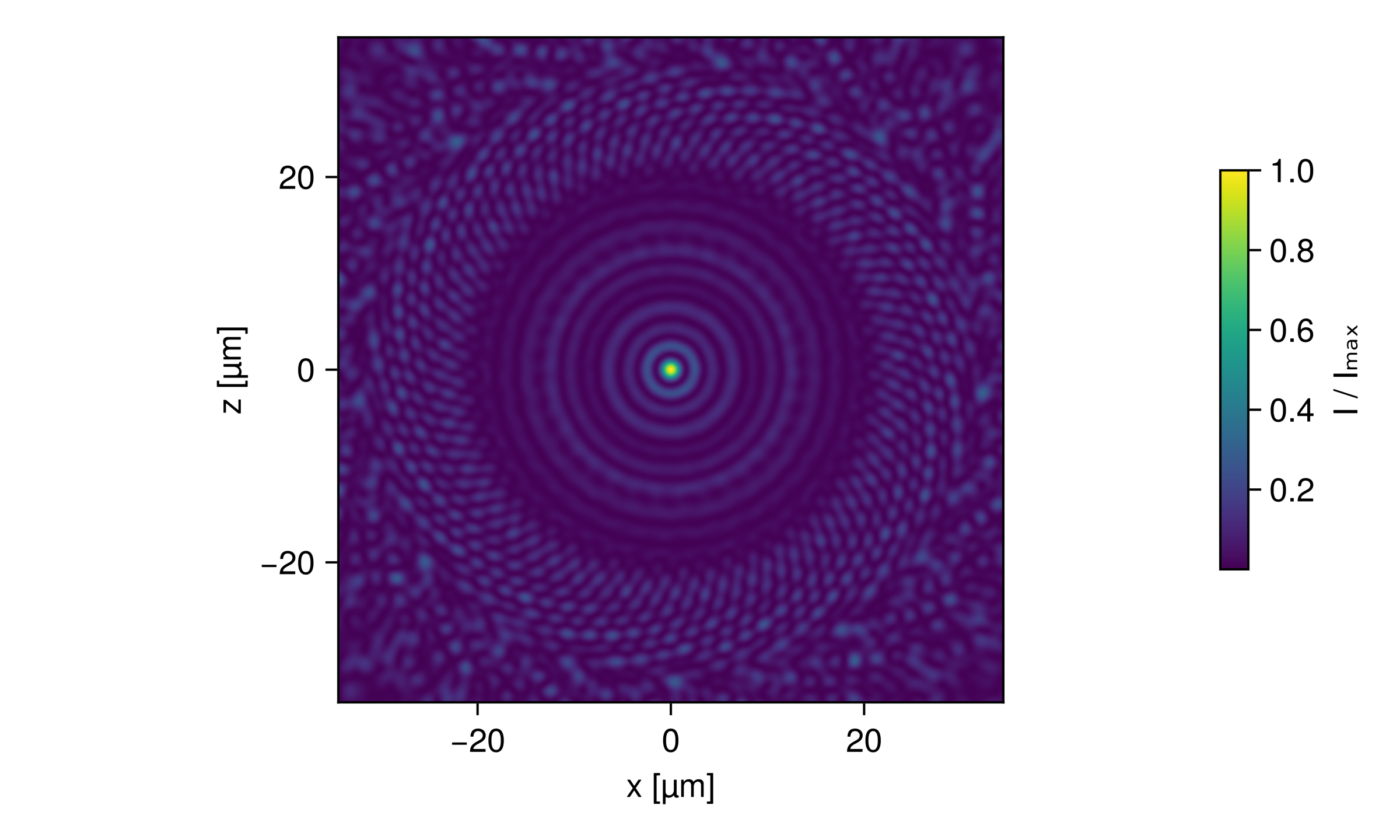
For PolarizedRays the field is added as 3D vectors, so electric_field returns a matrix of complex vectors and each component of the focal field can be analyzed separately. This becomes relevant at high NA, where the field vectors tilt towards the optical axis.
PSF examples
The Point spread functions example page covers the Airy disc, an aberrated asphere and the vectorial focus of a parabolic mirror at NA 0.88, including the caveats on collimated sources and ray amplitudes.
OpticsBase interoperability
If OpticsBase.jl is loaded alongside BMO (using OpticsBase), the BeamletOpticsOpticsBaseExt package extension adds a PlaneField constructor for a Detector. It samples the physical field of the beamlet hits as tangential electric and magnetic field on the detector plane, OpticsBase's single exchange format for coupling to other Maxwell solvers (angular spectrum propagators, BPM, FDTD, ...). Unlike electric_field(::Detector), it carries no √cos θ projection factor, so for an oblique beam its Poynting flux is the full beam power.
OpticsBase is not registered yet
Until OpticsBase is in the General registry, BMO cannot declare the extension, and using OpticsBase alone does not load it. Add OpticsBase from its repository and include the extension file once per session:
using Pkg
Pkg.add(url = "https://github.com/StackEnjoyer/OpticsBase.jl")
using BeamletOptics, OpticsBase
include(joinpath(pkgdir(BeamletOptics), "ext", "BeamletOpticsOpticsBaseExt.jl"))OpticsBase.PlaneField Method
OpticsBase.PlaneField(detector::BeamletOptics.Detector;
    size::NTuple{2,Int}, spacing::NTuple{2,Real},
origin = BeamletOptics.position(detector), axes = <default detector frame, see below>)Samples the coherent field of the beamlets hitting a BeamletOptics (BMO) Detector into an OpticsBase.PlaneField. Call it after solve_system! and before moving or emptying the detector. Requires using OpticsBase (package extension).
Arguments
detector: a BMODetectorwhose hits are allGaussianBeamletHitor allAstigmaticGaussianBeamletHit(i.e. Gaussian beamlet sources; pure-ray hits have no scaled field in BMO and throw anArgumentError, as does an empty detector). All hits must share the vacuum wavelength and the refractive index of the medium in front of the detector.size(keyword, required): number of samples(nx, ny)along the plane'su,vaxes.spacing(keyword, required): sample spacings(Δu, Δv)in [m], as inOpticsBase.PlaneField.origin(keyword): center of the plane in global coordinates in [m]. Default: the detector position.axes(keyword):3×3matrix with columnsu,v,n(seeOpticsBase.PlaneField). Default:n = −orientation(detector)[:, 2](BMO's detector normal points against the beam;npoints downstream, i.e. the direction the light was travelling in when it hit the detector),u = −orientation(detector)[:, 1](BMO's local detector x axis) andv = n × u(BMO's local −z axis), matching the default port of BMO's detector hit readers.
Conventions
Eis the physical field: the coherent sum of the beamlet fields at the plane's sample points, projected ontou,v. Unlikeelectric_field(detector), it carries no√|cos θ|projection factor; for oblique beamspower(f)is the full beam power crossing the plane, not the detector-area power density integral.His the coherent sum, over hits, of(n_medium/Z₀) dᵢ × Eᵢ, withdᵢthe propagation direction of the chief/stigmatic ray of hitiandEᵢthat hit's own 3D field contribution at the sample point (not the paraxial(n/Z₀) n × Ebuilt from the total field, which would be exact only for normal incidence); this matches the surface-equivalence-theorem content ofPlaneFieldeven for beams that hit the plane off-normal.R = Inf(no reference sphere removed: BMO's beamlet field already carries the full spatial phase without needing one).Eᵢneeds a 3D direction for each hit's otherwise-scalar contribution:AstigmaticGaussianBeamletHits use their chief ray's own polarization (beamlet_hit_polarization). StigmaticGaussianBeamletHits carry no polarization in BMO (the model is scalar); by convention, matchingOpticsBase's own rule for a scalar field (PlaneField(E::AbstractMatrix, ...)puts a scalar field entirely intoEu), such a hit's contribution is polarized along the plane'suaxis, made transverse to the hit direction (alongvifuis parallel to it). At normal incidence this is exactlyu.n(medium refractive index) is that of the hits;λis their shared wavelength.Time convention
exp(−iωt), as in BMO andOpticsBase.
Throws an ArgumentError if the detector has no hits, if the hits are not beamlet hits, or if the hits do not share wavelength and refractive index.
The return paths, WavefrontBeamletDecomposition and GaussianModeDecomposition for a PlaneField, are documented in OpticsBase fields as beam groups. Without a detector, a single traced beamlet segment is sampled with PlaneField(beamlet, id; ...), which components that hand light to another solver use in their interact3d method, see Re-emitting components.