Visualization
There are two ways to look at a simulation: the interactive GUI of the package BeamletOpticsGUI, in which the components are moved with the mouse and the beams and detector signals follow live, and the render functions of BeamletOptics itself, which draw systems and beams into any Makie scene, e.g. for figures. The GUI draws with the same render functions.
Interactive GUI
BeamletOpticsGUI opens a setup in an interactive window: select and move components with the mouse, keyboard or the card of a component, and the systems are solved again after each change. Detector panels show spot diagrams or intensities with metrics, clip planes cut into the setup, beams and distances can be measured, and the changed poses are exported as Julia code. Own components get their own cards, and own panels, controls and tools can be added.
using GLMakie, BeamletOptics, BeamletOpticsGUI

gui = live_view(system, beam; layout = :app)
display(gui)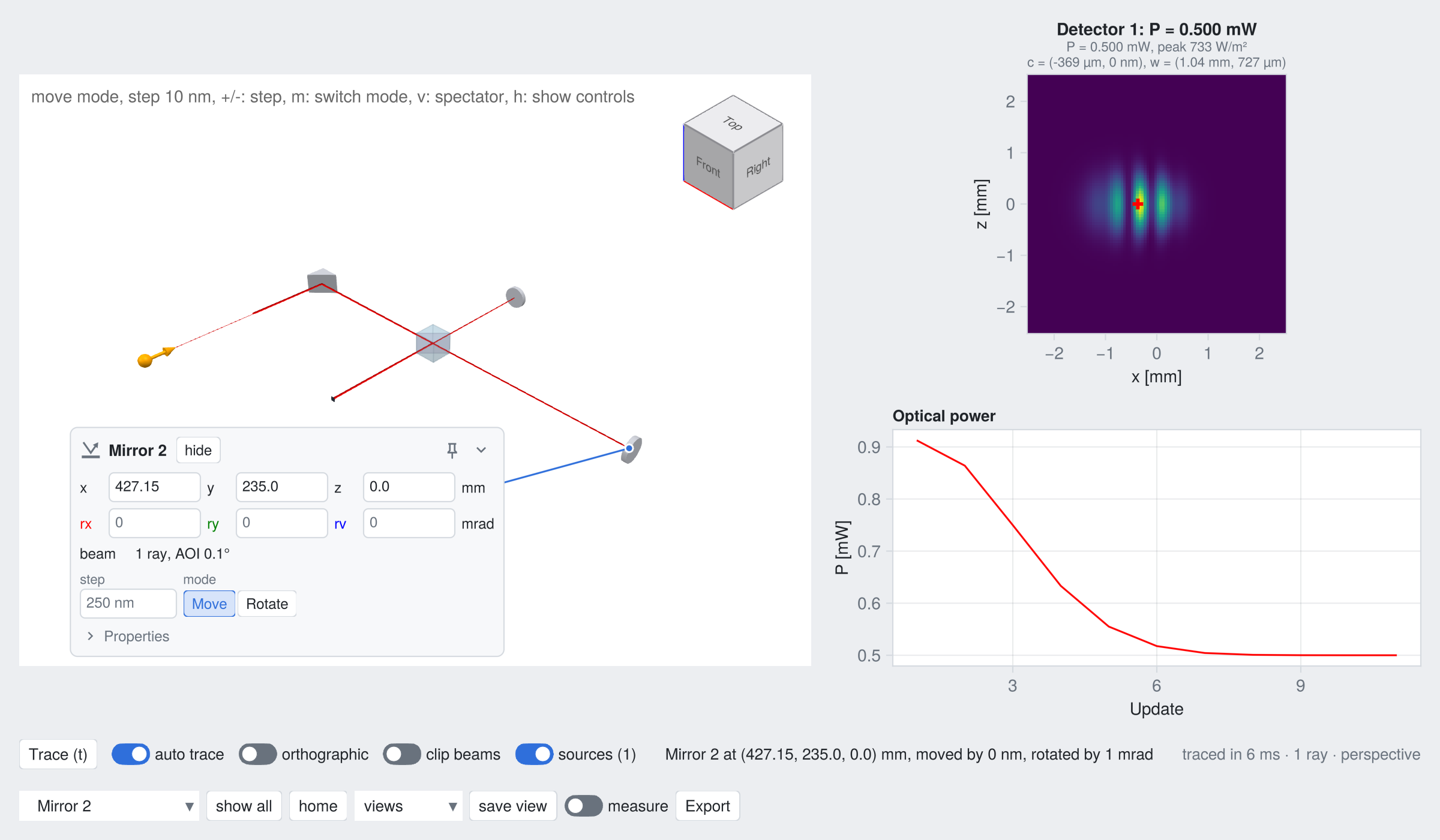
The GUI is a separate package, since it depends on Makie and changes independently of the optics. It builds on the Live rendering of BeamletOptics and its render handle protocol. Installation, the features and the API are documented in the BeamletOpticsGUI repository.
Rendering with Makie
The following pages document the render! function sorted by the type of the object being rendered, and the tools around it. Refer to the extensive Makie documentation and the Examples and the Tutorials sections of this package for a variety of showcases on how to visualize your simulation.
Rays and beams: single rays, beams of rays and beam groups
Gaussian beamlets: stigmatic and astigmatic Gaussian beamlets
Components and systems: optical components, polarizers, systems and the underlying shapes
Look: materials, feature edges and lighting of the rendered objects
Scene and camera: helpers for framing and annotating a 3D scene
Live rendering: plots that follow moving components and changing beams, e.g. for animations, and the render handle protocol for packages built on BeamletOptics
Backends
The rendering functionality is provided by a package extension that is loaded together with a Makie backend:
GLMakie is recommended. It opens interactive windows in which a 3D scene can be rotated and zoomed, supports both
LSceneandAxis3, and handles regular 2D plots (e.g.lines,scatter,heatmap) as well.CairoMakie is intended for static, high-quality PNG/PDF output. Only
Axis3is supported for 3D renderings (see therender!docstring below).
A first plot
A minimal plot needs a Figure, a 3D axis (LScene or Axis3) and one render! call per object that should be shown. Systems and beams are rendered the same way:
using GLMakie, BeamletOptics

mirror = RoundPlanoMirror(25e-3, 5e-3)
system = System([mirror])
beam = Beam([0, -0.1, 0], [0, 1.0, 0], 1e-6)
solve_system!(system, beam)

fig = Figure()
ax = LScene(fig[1, 1]) # or Axis3(fig[1, 1], aspect=:data)
render!(ax, system)
render!(ax, beam)
display(fig)How render! works
render! is a single generic function with many methods. The method is selected by the type of the second argument, i.e. the object that is rendered, so a Beam is drawn differently from a GaussianBeamlet or a lens. Keyword arguments and their defaults therefore differ between methods and are documented on the following pages next to the type they belong to.
Typing
?render!in the REPL prints every docstring ofrender!at once.Typing
?render!(ax, beam), withaxandbeamdefined, prints only the docstrings of the methods that match those argument types.methods(render!)lists all methods that are currently available.
Passing a renderable type for which no method exists throws a RenderNotImplementedError. Calling render! before a backend has been loaded throws a BeamletOptics.MissingBackendError.
BeamletOptics.render! Method
render!(axis, thing; kwargs...)The render! function allows for the visualization of optical system and beams under the condition that a suitable backend is loaded. This means that either one of the following packages must be loaded in combination with BeamletOptics via using:
GLMakie
preferred for 3D viewing
use
LSceneorAxis3environments
CairoMakie
preferred for the generation of high-quality .pngs
only
Axis3is supported
If no suitable backend is loaded, a MissingBackendError will be thrown.
Implementations reqs.
All concrete implementations of render! must adhere to the following minimal interface:
render!(axis, thing; kwargs...)
axis: an axis type of the union ofLSceneorAxis3thing: an abstract or concrete object or beam typekwargs: custom orMakiekeyword arguments that are passed to the underlying backend
Refer to the BeamletOptics extension docs for Makie for more information.
Loading the extension
Refer to the following snippet for an example on how the extension loading behaves. When only BMO is loaded, the render! function becomes available but will throw an BeamletOptics.MissingBackendError when trying to plot something.
julia> using BeamletOptics

julia> methods(render!)
# 1 method for generic function "render!" from BeamletOptics:
 [1] render!(::Any, ::Union{BeamletOptics.AbstractSystem, BeamletOptics.AbstractBeam, BeamletOptics.AbstractObject, BeamletOptics.AbstractObjectGroup, BeamletOptics.AbstractRay, BeamletOptics.AbstractShape}, kwargs...)
     @ C:\Users\anon\.julia\dev\BeamletOptics\src\Render\RenderCore.jl:59

julia> axis = nothing;

julia> mirror = RoundPlanoMirror(25e-3, 5e-3);

julia> render!(axis, mirror)
ERROR: It appears no suitable Makie backend is loaded in this session.
Stacktrace:
 [1] render!(::Nothing, ::Mirror{Float64, BeamletOptics.PlanoSurfaceSDF{Float64}})
   @ BeamletOptics c:\Users\anon\.julia\dev\BeamletOptics\src\Render\RenderCore.jl:59
 [2] top-level scope
@ REPL[5]:1Once a backend has been loaded, additional dispatched versions of render! become available.
julia> using GLMakie

julia> methods(render!)
# ... methods for generic function "render!" from BeamletOptics:
  [1] render!(axis::Union{Axis3, LScene}, gauss::GaussianBeamlet; r_res, z_res, kwargs...)
     @ BeamletOpticsMakieExt C:\Users\anon\.julia\dev\BeamletOptics\ext\RenderGaussian.jl:207
  [2] render!(axis::Union{Axis3, LScene}, bg::AstigmaticBeamGroup; r_res, z_res, kwargs...)
     @ BeamletOpticsMakieExt C:\Users\anon\.julia\dev\BeamletOptics\ext\RenderAstigmaticGaussian.jl:237
  [3] render!(axis::Union{Axis3, LScene}, beam::Beam; kwargs...)
     @ BeamletOpticsMakieExt C:\Users\anon\.julia\dev\BeamletOptics\ext\RenderBeam.jl:279
  ⋮